Page Router vs App Router in Next.js: Differences, Code Examples and Which to Choose

The App Router is the default and recommended router in Next.js for new projects. It was introduced in Next.js 13 and is built on React Server Components, nested layouts and streaming. The Pages Router is the older file-based system built around the pages folder. It is still supported and works well for existing apps, and you can use both in one project and migrate step by step.
Key Takeaways
- Choose the App Router for new projects. It gives you Server Components, shared layouts, streaming and the Metadata API.
- Keep the Pages Router for stable apps that work well, or while you plan a gradual move. It is still supported.
- The two routers can live side by side. Migrate one route at a time and avoid two files that serve the same URL.
- Data fetching changes the most:
getServerSidePropsandgetStaticPropsare replaced byasyncServer Components. - Next.js 16 (October 2025) made Turbopack the default bundler, replaced
middleware.tswithproxy.tsand requires asyncparamsandsearchParams.
What is the difference between the Page Router and the App Router?
Both routers map files to URLs, but they differ in where those files live and how pages render and fetch data.
| Feature | Pages Router | App Router |
| Folder | pages/ | app/ |
| Introduced | Original Next.js router | Next.js 13 (stable in 13.4) |
| Rendering model | Client components, with server rendering per page | Server Components by default, client components opt in with 'use client' |
| Data fetching | getStaticProps, getServerSideProps, getStaticPaths | async components and fetch on the server |
| Layouts | _app and custom wrappers | Nested layout.tsx files that persist across navigation |
| Loading and errors | Handled manually | loading.tsx, error.tsx and Suspense streaming |
| Metadata and SEO | next/head | Metadata API and generateMetadata |
| API endpoints | pages/api | Route Handlers in route.ts |
| Mutations | API routes plus client code | Server Actions |
| Learning curve | Gentler | Steeper at first |
| Status | Supported, no new major features | Recommended, where new features land |
For the official reference, see the App Router docs and the Pages Router docs.
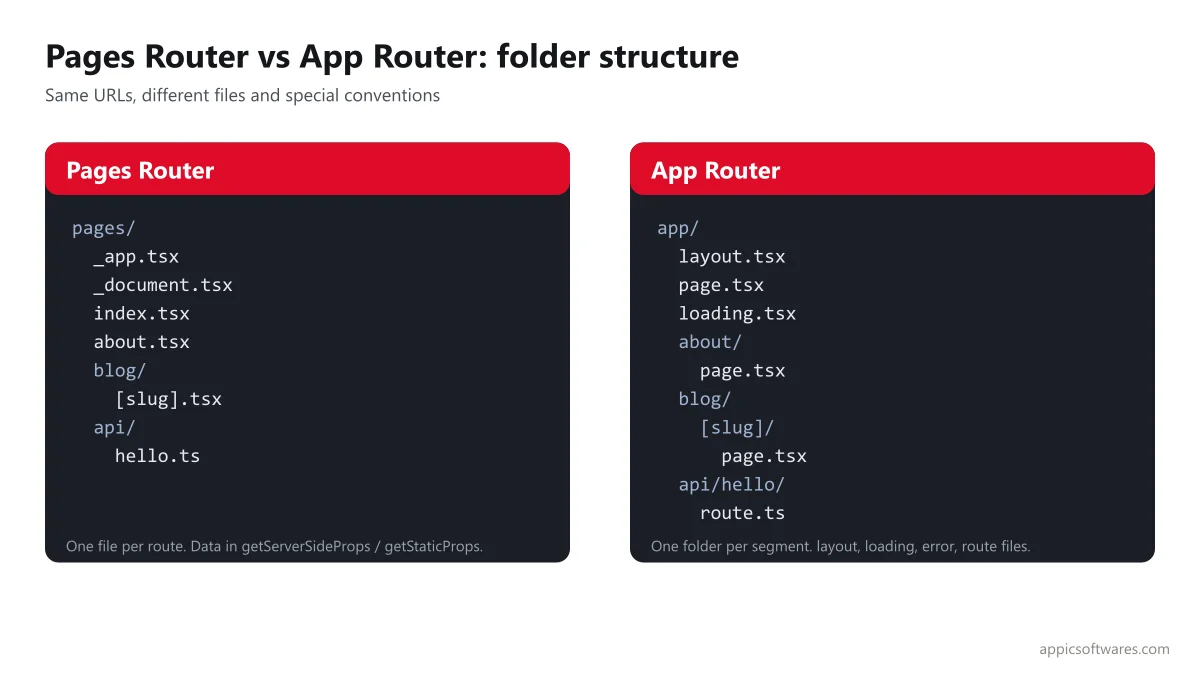
How does routing work in each router?
Pages Router
Every file in pages/ becomes a route. pages/about.tsx serves /about, and pages/blog/[slug].tsx serves dynamic URLs such as /blog/hello. API endpoints live in pages/api. Shared UI such as headers goes in _app.tsx or a wrapper component. It is simple and easy to learn.
App Router
Every folder in app/ is a route segment, and a route is public only when it has a page.tsx file. Special files add behavior: layout.tsx for shared UI, loading.tsx for loading states, error.tsx for error handling, not-found.tsx and route.ts for API endpoints. Layouts nest and do not re-render when you move between pages inside them.
How does data fetching differ?
In the Pages Router you pick a data function per page. getStaticProps runs at build time, getServerSideProps runs on each request, and getStaticPaths lists dynamic paths to pre-render.
// pages/blog/[slug].tsx (Pages Router)
import type { GetServerSideProps } from 'next';
import Head from 'next/head';

export const getServerSideProps: GetServerSideProps = async ({ params }) => {
  const res = await fetch(`https://api.example.com/posts/${params?.slug}`);
  const post = await res.json();
  return { props: { post } };
};

export default function BlogPost({ post }: { post: { title: string; body: string } }) {
  return (
    <>
      <Head><title>{post.title}</title></Head>
      <article><h1>{post.title}</h1><p>{post.body}</p></article>
    </>
  );
}
In the App Router you fetch data directly inside an async Server Component. Metadata moves to generateMetadata. In Next.js 15 and later, params is a Promise, so you await it.
// app/blog/[slug]/page.tsx (App Router)
import type { Metadata } from 'next';

type Props = { params: Promise<{ slug: string }> };

async function getPost(slug: string) {
  const res = await fetch(`https://api.example.com/posts/${slug}`);
  return res.json();
}

export async function generateMetadata({ params }: Props): Promise<Metadata> {
  const { slug } = await params;
  const post = await getPost(slug);
  return { title: post.title };
}

export default async function BlogPost({ params }: Props) {
  const { slug } = await params;
  const post = await getPost(slug);
  return (
    <article>
      <h1>{post.title}</h1>
      <p>{post.body}</p>
    </article>
  );
}
Interactive parts use a client component. Put 'use client' at the top of the file and the component can use state, effects and browser APIs:
// app/components/LikeButton.tsx
'use client';
import { useState } from 'react';

export default function LikeButton() {
  const [count, setCount] = useState(0);
  return <button onClick={() => setCount(count + 1)}>Likes: {count}</button>;
}
API endpoints also change. In the App Router, a file at app/api/hello/route.ts exports functions named after HTTP methods:
// app/api/hello/route.ts
export async function GET() {
  return Response.json({ message: 'Hello' });
}
How do rendering and caching compare?
With the Pages Router you choose static generation, server-side rendering or client rendering for each page. With the App Router, rendering is more granular: server components render on the server and send no component JavaScript to the browser, parts of a page can stream in as they are ready, and only client components are hydrated.
Caching has changed over time. Next.js 16 uses an opt-in model called Cache Components, where you mark what to cache with the use cache directive, and it builds on Partial Prerendering for fast navigation (Next.js 16 release notes). If you read older tutorials about automatic caching of every fetch, check them against the version you use.
Which one is better for SEO?
Both routers can produce fast, crawlable HTML. The App Router has built-in tools that make good SEO easier: the Metadata API for titles, descriptions and Open Graph tags, generateMetadata for dynamic pages, and file conventions for sitemap.ts, robots.ts and structured data. Server Components also help by sending less JavaScript. Page speed still depends on your images, fonts, third-party scripts and data calls, and not just on the router. For more on this stack, read our guide to Next.js trends.
Not sure which router fits your project or how to migrate? We can review your app and give you a plan. Get your project scoped
When should you use the Pages Router or the App Router?
| Situation | Better choice | Why |
| New project in 2026 | App Router | Recommended path, where new features land |
| Large app with shared layouts and nested sections | App Router | Nested layouts and streaming |
| Content site where SEO matters | App Router | Metadata API and Server Components |
| Stable production app that works well | Pages Router for now | Little to gain from a rewrite right away |
| Small team new to React Server Components | Either, but plan to learn App Router | Pages is simpler, but App Router is the future |
| Heavy use of libraries that need the browser | Either | App Router needs client components for these |
| Want to modernize slowly | Use both | Routers can coexist; migrate route by route |
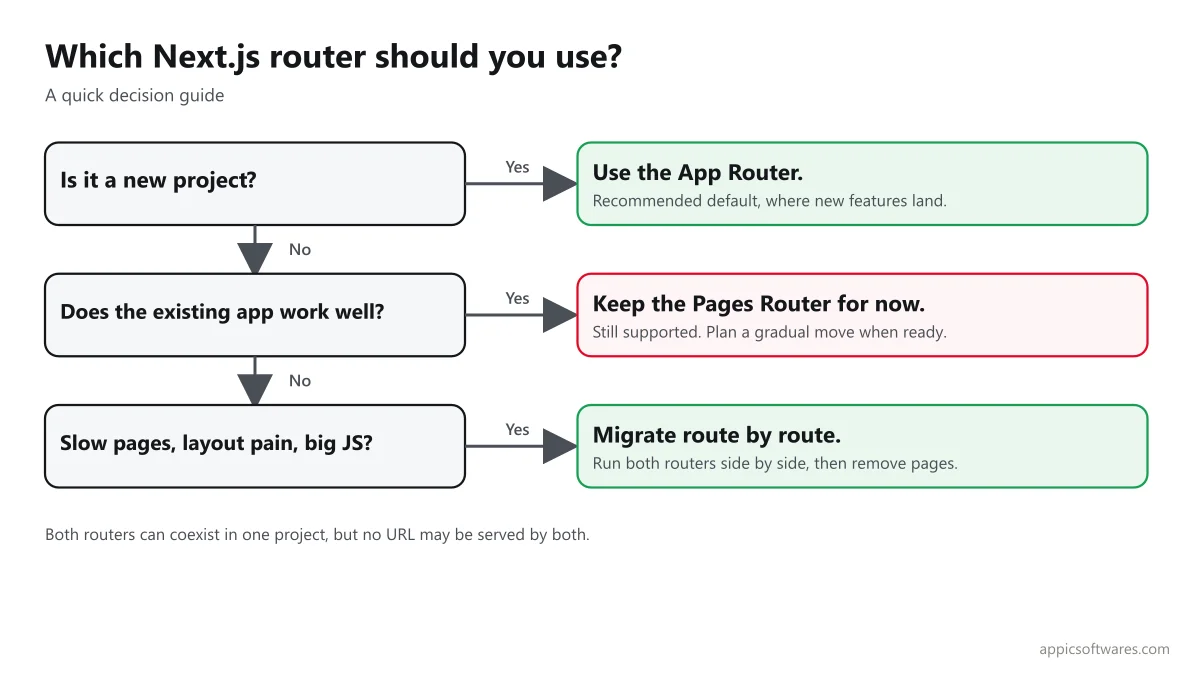
How do you migrate from the Pages Router to the App Router?
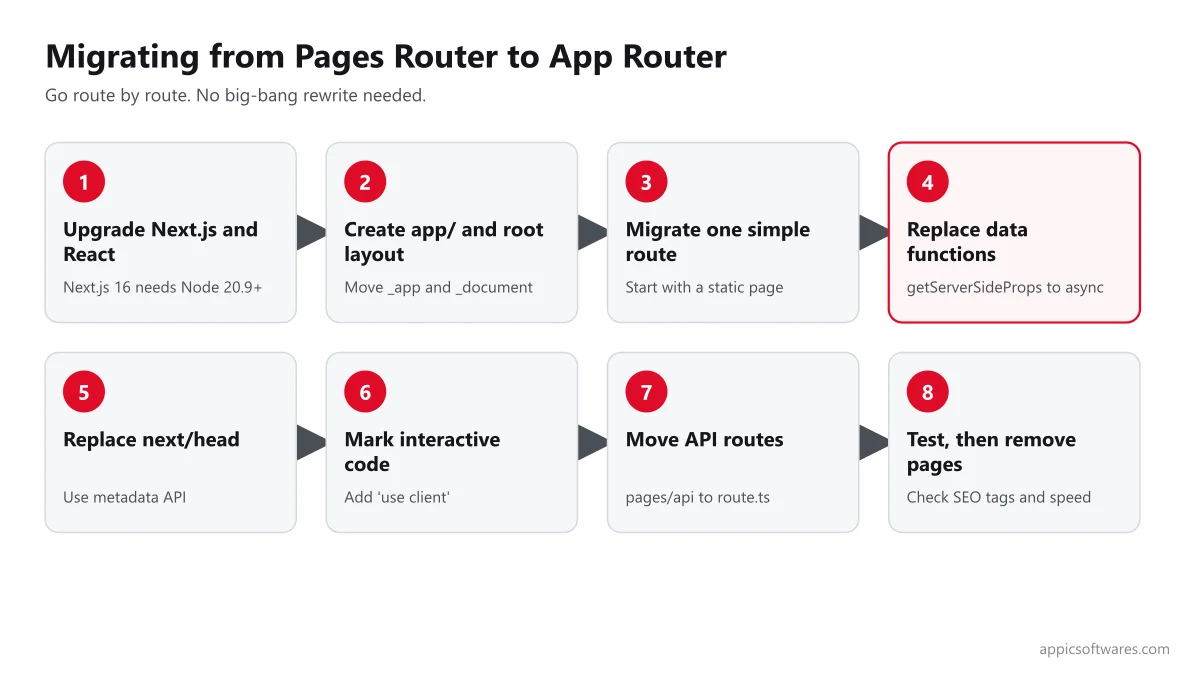
You do not have to migrate everything at once. Next.js lets both routers run in the same app, as long as no two files serve the same URL (migration guide).
- Upgrade. Move to a current Next.js and React version, and check Node.js requirements. Next.js 16 needs Node.js 20.9 or later.
- Create
app/with a root layout. Move the content of_appand_documentintoapp/layout.tsx. - Migrate one simple route. Start with a static page to learn the structure.
- Replace data functions. Turn
getServerSidePropsandgetStaticPropsintoasyncServer Components, and set caching with the options your version supports. - Replace
next/head. UsemetadataorgenerateMetadata. - Mark interactive code. Add
'use client'to components that use state, effects or browser APIs. - Move API routes. Convert
pages/apihandlers to Route Handlers where it makes sense. - Test and remove the old route. Compare output, SEO tags and performance before you delete the
pagesversion.
What are common mistakes when moving to the App Router?
- Making everything a client component. This removes the main benefit. Keep
'use client'on small interactive pieces. - Forgetting that
paramsis async. In current versions you mustawaitparamsandsearchParams. - Using browser-only libraries in Server Components. Wrap them in a client component.
- Context providers in the wrong place. Put providers in a client component and render it in the layout.
- Following old caching advice. Caching rules changed between Next.js 13, 14, 15 and 16.
- Duplicate routes. The same URL in both
pagesandappcauses an error.
What changed in Next.js 16?
Next.js 16 was released on October 21, 2025. The official notes list Turbopack as the stable default bundler, Cache Components with use cache, proxy.ts replacing middleware.ts for the network boundary, React 19.2 support, a Node.js 20.9 minimum and required async params and searchParams (Next.js 16). Release trackers list a Next.js 16.2 patch line as current and Next.js 15 reaching end of life on October 21, 2026, so check Vercel's support policy for your version.
Free Next.js architecture review: share your repo or a short description. We will tell you whether to migrate, in what order and what it should cost. Book your review
How Appic builds with Next.js
Appic Softwares has built custom software since 2018, with offices in Jaipur (India), Frisco, Texas (USA) and Munich (Germany), and holds a 5.0 rating on Clutch from 24 verified reviews. Our own website runs on Next.js with the App Router. Our Next.js development company team builds new apps, upgrades and router migrations, and you can pair it with our React web development services or hire developers in India. Related reading: MERN stack with Next.js, Auth0 Next.js authentication and modern React design patterns. Typical projects start around $10,000.
What changed from the earlier version of this post?
The earlier version, published in 2024, described both routers in general terms but promised code examples that it did not include, and it did not cover Next.js 15 or 16. This update adds a comparison table, side-by-side code, caching and SEO notes, a decision table, migration steps and common mistakes.
Planning a Next.js build or migration? Send us your goals, your current stack and your timeline. We will reply with a plan, a migration order and a cost range you can review with your team. Talk to our team
Frequently Asked Questions
What is the difference between the Pages Router and the App Router in Next.js?
The Pages Router uses the pages folder, with one file per route and data functions such as getServerSideProps. The App Router uses the app folder, nested layouts and React Server Components, with data fetched inside async components. The App Router is the recommended choice for new projects, while the Pages Router remains supported.
Is the Pages Router deprecated?
No. The Pages Router is still supported and works for existing apps, but new features are built for the App Router. You can run both routers in the same project and migrate gradually. Check the official Next.js documentation for the current support position for your version.
Should I use the App Router for a new project?
Yes, in most cases. The App Router is the recommended default, with Server Components, nested layouts, streaming and the Metadata API. Choose the Pages Router only if your team has a strong reason, such as a library that does not yet work well with Server Components.
Can I use the Pages Router and the App Router together?
Yes. Next.js supports both in one app, which makes incremental migration possible. Each URL must be served by only one router, so you cannot have the same route in both the pages folder and the app folder. Move routes one at a time and test each step.
Is the App Router better for SEO?
Both can rank well. The App Router makes technical SEO easier with the Metadata API, dynamic metadata, sitemap and robots files, and less JavaScript through Server Components. Rankings still depend on content quality, page speed and links. Moving to the App Router alone will not guarantee a ranking change.
How hard is it to migrate from the Pages Router to the App Router?
It depends on app size. Small apps can move in days, while large apps with custom data layers, many libraries and authentication need a phased plan. Start with a simple route, convert data fetching, replace next/head with metadata and add use client where needed. Test SEO tags and performance at each step.
Related Articles

Top 12 Next.Js Development Companies In 2025
The digital landscape continues to evolve rapidly, with businesses increasingly relying on cutting-edge technologies to stay competitive. Among these technologies, Next.js has emerged as a popular framework for building dynamic and performant web applications. As the demand for Next.js development services grows, businesses must partner with reliable and skilled development companies to bring their visions […]

7 Next.Js Trends To Know
In 2024, Next.js continues to evolve rapidly, introducing new trends and advancements that shape the landscape of web development. Here’s an introduction to seven key Next.js trends to know in 2024, including features, tools, and best pra ctices that are reshaping the way developers build modern web applications. From serverless architecture to enhanced developer experience, […]

What Is NextJS? Why Choose It For MVP Development 2025?
Being able to build and adjust to online reality with greater flexibility is one of the main advantages of learning Next.js. As a Next JS development services provider, we believe internally that being able to rapidly test our ideas is the most significant advantage in the rapidly expanding digital world. If we are successful, maintaining […]

Auth0 Next.js Authentication: A Step-by-Step Setup with the Current SDK, Plans and Common Pitfalls
Authentication, the process of confirming a user’s identity, is essential for web applications. It typically involves verifying credentials, such as usernames and passwords, or utilizing advanced methods like facial recognition. On the other hand, authorization dictates what actions a user can perform within the application. When it comes to handling authentication and authorization, developers face […]

How To Use MERN Stack With Next.Js? Best Practices & More
The MERN stack, which consists of MongoDB, Express.js, React, and Node.js, has become a popular choice for developers to build modern web applications. Each of these technologies plays a specific role in creating a full-stack web app: MongoDB serves as the database, Express.js acts as the backend framework, React is responsible for the frontend, and […]

12 Best Next.Js Development Companies In 2025
The demand for Next.Js is all-time high, with 1,886 programs running on Next.Js as of 22 September 2024. Its serverless functioning, file-based routing, SEO friendliness, and more are the reasons why the technology is in demand nowadays. Moreover, if you are looking for Next.js development companies that can help you with developing your project or […]