Indeed, very few online shops are considering the release of an e-commerce app; nevertheless, the creation and release of a mobile app alone is insufficient as a remedy. To make sure that your app development efforts are profitable and successful, you must concentrate on the eCommerce checkout sequence. But frequently, the checkout procedure can be difficult to understand and navigate, leaving customers dissatisfied and carts abandoned.
This post will examine the phases involved in the eCommerce checkout process, as well as typical problems relating to cart abandonment.
We’ll also provide you with pointers on how to design an eCommerce user experience that meets or exceeds the benchmarks set by the top online retailers. Thus, let’s get started right now.
What is an eCommerce checkout flow?
When a consumer is prepared to purchase from an online store, they go through a process known as the eCommerce checkout flow. This process usually entails choosing a payment option, adding products to a shopping cart, and inputting shipping details. To make the checkout process quick and easy, these procedures must be optimized.
The number of steps required, the design of the app, and the available payment methods are just a few of the variables that might impact the eCommerce app checkout process. Furthermore, when it comes to the checkout procedure, various clients could have different tastes.
For instance, while some clients could opt to use PayPal, others would prefer to pay with a credit or debit card. Making an eCommerce app checkout process as easy to understand as simple as possible is essential to its success.
Let’s examine the Amazon app checkout procedure to gain a better understanding.
A peek into Amazon’s checkout flow
You click the link in an email you receive from Amazon promoting a product to be taken to the product page. After reading the copy, looking at the photos, and reading the reviews, you return to the page’s top and click the “Add to Cart” button.
After that, all you have to do to complete the checkout procedure is enter your password once and click two or three times.

However many companies that don’t optimize the steps in their checkout process wind up with a high rate of shopping cart abandonment.
According to data from the Baymard Institute, 69.57% of online shopping carts are abandoned, meaning that only 30% of potential customers complete their purchases out of every 100. Shopping cart desertion is a serious issue for online retailers. Thus, we have compiled a few strategies to streamline the checkout process to assist you in avoiding this.
However, let’s first examine some of the typical causes of abandoned carts before moving on.
Reasons leading to abandoned carts
A high percentage of shopping cart abandonment can be caused by several relatively common factors. Some of them include:

Requiring customers to create an account
A lot of online retailers require users to register for an account before they can finish a transaction. For some consumers, though, this can be a turnoff because they might not want to spend the time creating an account. Customers could also be hesitant to divulge their personal information to a business they do not know well.
Lengthy and complicated checkout process
A protracted and intricate checkout procedure may irritate clients and lead to their abandoning shopping carts. The checkout procedure should be as simple and quick as feasible to maximize its effectiveness.
Hidden fees and shipping costs
If customers discover unanticipated hidden fees or shipping costs, they may be discouraged from completing the purchase. It is crucial to be clear about all fees and shipping costs from the start to prevent this problem.
Lack of payment options
Customers may be less inclined to finish a transaction if they do not have their preferred payment option available. Debit cards, credit cards, UPIs, PayPal, and Apple Pay are just a few examples of the different payment gateway choices you should provide to attract a broader spectrum of clients.
Poor customer service
A consumer may be less inclined to finish a transaction if they have a negative encounter with customer service. It’s critical to respond quickly to questions and complaints from customers to deliver excellent customer service. You can contact us by phone, email, or live chat for this.
Delivery was too slow
Consumers want their purchases delivered as quickly as possible, so they cannot finish a transaction if they think the delivery will take too long. Giving customers access to tracking information and being transparent about delivery schedules will help prevent this problem. This way, buyers can see when their things will arrive.
The app was not secure
If users believe that the app is not safe, they could be hesitant to enter their personal information into an online form. Having safe apps with SSL certificates is essential to allay these worries.
Customers may be less inclined to finish a purchase if they believe they do not have adequate information about a product. It’s critical to add details such as product descriptions, customer reviews, and images to give enough information.
After discussing a few typical causes of cart abandonment during the checkout process, let’s continue to explore the eCommerce user flow in the next section:
eCommerce mobile app checkout process
The practice of purchasing and selling through smartphone apps has grown as more businesses go online. The proliferation of eCommerce apps has made it crucial for companies to comprehend best practices for eCommerce checkout. We will discuss the many processes that make up a mobile eCommerce checkout process in this section.
A. Add to cart option
While adding features to an eCommerce application, you might not think of a simple icon on the cart option as a strong visual cue. You ought to depict the movement or transition of the item being added to the cart. Additionally, a design for the checkout process is created, and it should be possible to change the “Add to Cart” option to “Added to Cart.”
B. Once the product is added to the cart
At this point, there are usually two choices: either keep everyone on the same page or redirect them to the cart page. When both are finished, there ought to be a page where:
- The contents of the cart, the total cost, and the quantity are all clearly stated.
- Simpleness of updating or changing the products
- Above and below the cart, there are two CTAs urging users to check out.
- User reminders regarding shipment, returns, etc.
C. Sign-up after order
In general, while designing the checkout page, avoid making it necessary for consumers to create an account. Guests should always be able to check out as guests. You may always market to them and ask them to register for an account on your app once you have their name, email address, and contact details.
Have an email address and a social media account, if you feel that’s required. Never ask someone to complete lengthy forms.
D. Make a payment stage
This is the final step in designing an eCommerce app and the point at which all mobile app development work is concentrated. At this point, as an eCommerce app development firm, we adhere to the following checkout page best practices.
- After the procedure is complete, request the debit and credit card numbers.
- Create a payment form that resembles an online credit card.
- Add components, like as badges and certificates, that highlight app security.
- Save credit card details within the framework.
Therefore, the following guidelines should be observed when designing eCommerce mobile apps with checkout sections. After taking a look at it, allow us to provide you with some brief advice on how to make the checkout process steps yield the highest return on your investment in eCommerce app development.
Tips for optimizing your eCommerce checkout flow
It’s critical to streamline your checkout procedure to lower the percentage of shopping cart abandonment, as abandoned carts cost businesses billions of dollars annually. To that end, the following guidelines will help you:

Prioritize mobile-friendly app design
It is imperative to have a mobile-friendly website in the modern world. It is essential to have a mobile-responsive design because mobile devices account for more than 55% of all web traffic.
Use a single-page checkout system
One excellent method of streamlining the checkout process and making it easier for customers is to implement a single-page checkout system. All required data, including shipping, invoicing, and payment information, are contained on a single page when using a single-page checkout system. Customers may easily locate what they need and easily finish their transactions thanks to this.
Offer a guest checkout option
Some customers may become discouraged if they need to register an account to finish a purchase. It’s critical to provide guest checkout to prevent this. As a result, clients won’t need to register for an account to finish their transactions.

Provide a progress indicator
One excellent technique to inform customers of their current status in the checkout process is using a progress indicator. Customers may feel less frustrated and remain on course as a result. Customers can use it as a helpful visual reminder of their progress.

Include clear calls to action
Although they are crucial to the design of any application, calls to action are particularly crucial during the checkout process. Customers should be directed to the next stage of the checkout process by the call to action, which should be brief and unambiguous.
Offer multiple payment options
It is imperative, as we have already stated, to provide a greater variety of payment alternatives to a larger clientele. Payment methods that are often used include PayPal, Apple Pay, and credit cards.
Make sure your app is secure
Consumers could be worried about entering their financial and personal details on an unsecured app. It is crucial to have a secure mobile application and a safe checkout procedure if you want to gain your client’s trust.

Provide live chat support
It’s critical to be able to offer live chat assistance to clients with queries or worries throughout the checkout process. This will enable you to resolve any problems as they arise and assist clients in completing their transactions without difficulty.
Focus on mobile checkout UX
On mobile devices, the checkout process may be more difficult due to the smaller screen and keypad. Make sure your layout is mobile-friendly and that clients can enter their information as easily as feasible. Improving the mobile user experience is essential to facilitating a smooth buying experience for users. Using form fields, progress indicators, and CTAs can enhance the mobile checkout process.
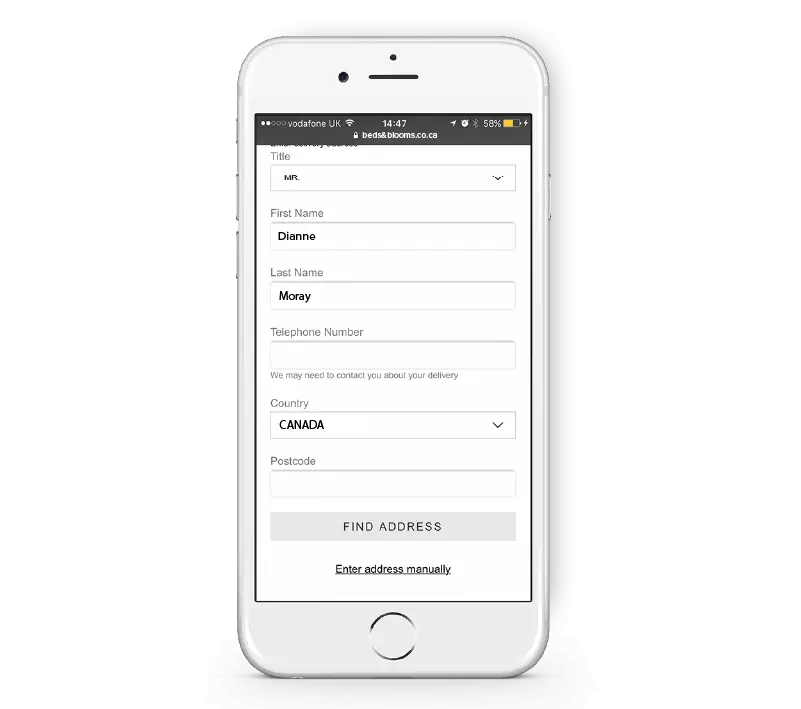
It is crucial to attempt to retrieve a purchase from a customer who is about to abandon their shopping cart. An exit-intent popup is one method for accomplishing this. A customer is going to abandon your website when this notice occurs. Usually, it’s used to give a deal or an incentive to complete the purchase.

Provide a summary of cart contents
Reminding customers of what they are going to buy can be accomplished quite well by displaying the contents of the shopping cart. Additionally, it may guarantee that clients are receiving the things they desire and assist clear up any confusion. Every page of the checkout process should display a summary that includes the total price, shipping charges, and any applicable taxes.

Show shipping options and costs early on
Early on in the checkout process, customers should be aware of shipping alternatives and associated costs so they may make an informed choice regarding their purchase. Not to be overlooked, offering free shipping is a fantastic method to motivate clients to finish their orders. If customers are aware that there will be no shipping costs, they are more likely to finish their order. This information ought to be easily accessible and publicly displayed.
Use persuasive copy
The language you use while a consumer is checking out can make a big difference in whether or not they finish their transaction. It’s critical to use persuasive copy that inspires confidence in your application among potential customers. A few things to keep in mind are speaking positively, emphasizing the advantages of the product, and conveying a sense of urgency.
Use customer testimonials
Testimonials from previous clients are a fantastic approach to gaining their trust and motivating them to finish their purchases. Testimonials from customers can be utilized on the checkout page itself or product pages individually during the checkout process.
Offer discounts and coupons
Offering coupons and discounts is a terrific approach to motivate clients to finish their orders. If a customer knows they will receive a discount, they are more likely to finish the transaction. Coupons and discounts can also help you develop a reputation as a customer-friendly business and gain the trust of your target market.

Use social proof
One of the best ways to gain your consumers’ trust and persuade them to buy from you is through social proof. Social media evaluations, customer ratings, and customer testimonials are some examples of how social proof is used.
Use security seals
Adding security seals to your products is a terrific method to gain your consumers’ trust and motivate them to finish their orders. You can utilize security seals in your app and in the checkout process. SSL certificates, McAfee Secure, and Norton Secured are examples of common security seals.

Have a clear privacy policy
When making an online purchase, customers want to know that their personal information is secure. Having a transparent privacy policy will help you gain your clients’ trust and motivate them to finish their orders. Both during the eCommerce checkout process and on your website, your privacy policy ought to be visible.

Offer a money-back guarantee
If buyers are aware that they have the option to return an item if they’re not happy, they’re more inclined to finish the transaction. Additionally, a money-back guarantee can boost return on investment and entice buyers to purchase an item.

Easy to understand checkout process
The consumer checkout experience for the app should be simple to comprehend. Every form field needs to have a clear label, and completing the form should be a simple process. Additionally, customers ought to have the ability to swiftly finish their buy after reviewing their order.
Consider offering the social sign-in option
Customers may easily complete the eCommerce app checkout process by utilizing social sign-in. Customers can use your app by logging in with their social media accounts, which will expedite the checkout process by pre-filling their shipping and personal information.

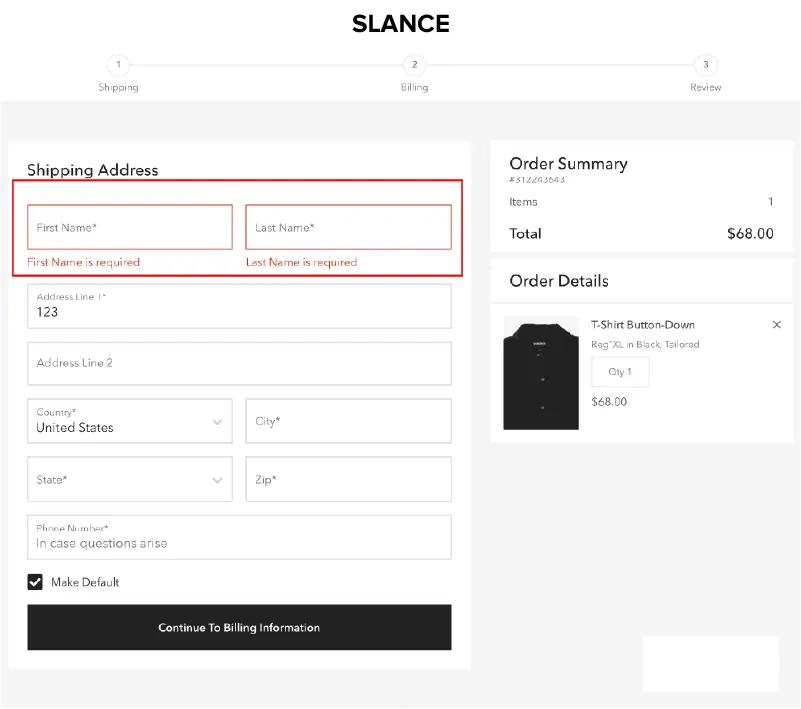
Validating forms can help firms obtain precise client information. The error messages come next, after validation. Make sure the error message is understandable if there is a problem with the eCommerce checkout process. It must be visible and simple to comprehend. Additionally, customers must be able to simply fix the mistake and get on with their purchase.
As was previously mentioned, the checkout process is critical for businesses, and an ideal eCommerce checkout flow may be created with the assistance of an app development company.
How can Appic Softwares help ideate the eCommerce checkout process?
To make sure that your eCommerce checkout process is user-friendly and encourages visitors to buy a variety of products, there are a few things you can do. Adidas is now able to access a vastly expanded user base thanks to the eCommerce platform we developed at Appic Softwares.
The app was meticulously created to support multi-regional content and items while maintaining the design system. To make sure that the program could be utilized anywhere in the world, other currencies were also included. With two million downloads and half a million new users, the outcome was impressive. Get in touch with our professionals right now if you’re searching for comparable eCommerce app development services!
FAQs
Q. How is the checkout procedure for an eCommerce app created?
A. This is a question for which there is no universally applicable solution because the optimal approach to develop a checkout process will rely on the particular requirements of your company. To make the eCommerce checkout process more user-friendly for customers, there are a few design recommendations for the checkout flow that you should follow:
- Create an eye-catching “Add to Cart” page.
- Create an open-access billing page.
- Add a guest checkout feature
- Cut down on the form’s field count.
- Put in security badges.
- Make the online store’s checkout procedure mobile-friendly.
- Provide a social login
- Leverage address shortcuts
- Enlarge and make the “Place Your Order” button noticeable.
- Employ concise error messaging
You may improve conversion rates by designing a checkout process that is user-friendly for customers by adhering to these criteria.
Q. How can the checkout process be made simpler?
A few steps can be taken to streamline the checkout procedure:
- A smaller amount of fields on the form
- Utilize address validation and shortcuts.
- Permit clients to store their details for upcoming transactions.
- Employ concise error messaging
You can streamline the checkout procedure and facilitate clients’ completion of purchases by adhering to these guidelines.