How To Add Google Analytics With Drupal In 2025?

Google Analytics is a web analytics service that enables marketers and website owners to monitor and evaluate several elements of user behavior and website performance. Moreover, if you’re looking for steps to add Google Analytics with Drupal then you are at the right place.
It offers insightful information about how people use a website, their origins, the material they interact with, and much more. To enhance their online presence and user experience, companies and website owners can make data-driven decisions using Google Analytics.
The Google Analytics module is available to Drupal users.
Benefits Of Integrating Drupal With Google Analytics
Integrating Drupal, a popular content management system (CMS), with Google Analytics can provide several benefits for website owners and administrators. Google Analytics is a powerful web analytics tool that offers insights into website traffic, user behavior, and other essential metrics. Here are some key benefits of integrating Drupal with Google Analytics:
-
Data-driven Decision Making
By integrating Google Analytics with Drupal, you gain access to valuable data and insights about your website’s performance. This data can help you make informed decisions regarding content strategy, user experience improvements, and marketing efforts.
-
User Behavior Analysis
Google Analytics provides detailed information about user behavior, including pages visited, time spent on the site, and navigation paths. This data allows you to understand how users interact with your Drupal website, helping you optimize content and design for a better user experience.
-
Audience Segmentation
Drupal and Google Analytics integration allows you to segment your website audience based on various criteria such as demographics, geography, and user interests. This segmentation can be valuable for targeted marketing campaigns and personalized content delivery.
-
Goal Tracking
Setting up goals in Google Analytics enables you to track specific user actions on your Drupal website, such as form submissions, downloads, or purchases. This feature helps you measure the success of your conversion paths and identify areas for improvement.
-
E-commerce Tracking
For Drupal websites with e-commerce functionality, integrating GA can provide detailed insights into online transactions. You can track sales, revenue, and other e-commerce metrics to optimize your online store and enhance the overall shopping experience.
-
Performance Monitoring
Google Analytics helps you monitor the performance of your Drupal website by providing information on page load times, bounce rates, and exit pages. Identifying and addressing performance issues can contribute to a smoother user experience and improved search engine rankings.
-
SEO Insights
Drupal and Google Analytics integration can offer valuable SEO insights, including keyword performance, organic search traffic, and referral sources. This information helps you refine your SEO strategy and improve your website’s visibility in search engine results.
-
Custom Reports and Dashboards
You can design unique reports and dashboards using GA that are suited to your requirements. This flexibility enables you to focus on the metrics that matter most to your Drupal website and easily share these insights with stakeholders.
-
Cross-Device Tracking
With Google Analytics, you can track user interactions across different devices and platforms. This cross-device tracking is essential for understanding how users move between devices and optimizing your Drupal website for a seamless multi-device experience.
-
Continuous Improvement
Armed with data from Google Analytics, you can continuously improve your Drupal website by identifying areas for enhancement, optimizing content, and refining your digital strategy based on real-time user feedback.
Also read this blog:-What Is Drupal Configuration Synchronizer?
Installation and configuration of Google Analytics module
Step 1
The tracking or measurement ID the user needs to connect to their Google Analytics account must be obtained to link your Drupal website to Google Analytics.
Step 2
Enter the tracking ID for your Drupal website in Google Analytics and obtain it, as indicated by the screenshot.


Step 3
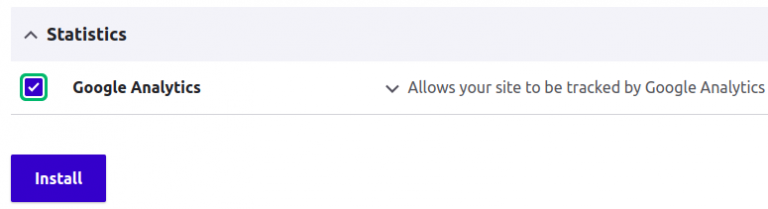
Use the composer command to install the module just like any other Drupal module, and then use Drush or the Drupal UI to enable it, as seen in the screenshot below manually:-

Step 4
After the module has been successfully installed, go to Configuration -> Google Analytics and enter the tracking/measurement ID that you previously copied.

Step 5
Go to your Google Analytics account’s real-time tab and click on Overview to check your site’s traffic data in order to test the integration’s success.

Conclusion
In summary, we have gained a complete understanding of how to integrate GA, a fantastic free service, with Drupal. This integration can aid with many website optimization tasks, user experience enhancements, search engine ranking improvements, marketing goal setting, and more.
Moreover, if you are looking to hire dedicated Drupal developers who can help you easily integrate or maintain your Drupal website.
Related Articles

5 Drupal10 Key Features That You Must Be Aware Of
Drupal is always changing to keep up with the demands of developing online applications. Drupal is a popular open-source content management system that is highly recommended for developing online applications. Following the recent upgrade from Drupal 9 to Drupal 10, have a look at these tips to stay up to date on all the major […]

How To Integrate Drupal With Apache Solr
Understanding Apache Solr The Apache Software Foundation created the open-source search engine known as Apache Solr. It provides strong search and indexing capabilities for webpages, databases, and other content, built on the Apache Lucene framework. You can integrate your website with Solr if you use Drupal. The Search API Solr Search module powers the Solr […]

Why Drupal 10 Is The Right Choice In 2025?
Drupal, a content management system with over 20 years under its belt, offers itself as open-source software. It has strength and reliability. The latest Drupal 10 version promises to boost performance and customization. This update aims to make creating and managing user-friendly digital experiences easier. Drupal 10 hit the scene on December 14, 2022. This […]

Step By Step Guide To Create Multi-Site In Drupal With Lando
This tutorial will teach us how to set up Drupal multi-site utilizing Lando, with a shared (single) codebase and a different database for each site on a local computer. Defining Lando Lando can be considered a Docker Compose tool as well as an abstraction layer and superset of the latter. Lando, as an abstraction layer, […]

What Is Drupal Configuration Synchronizer?
Drupal’s strong configuration Synchronization system assists developers in easily importing and exporting setups between multiple Drupal website instances. The synchronizer will assist you in several ways, such as allowing you to manage and deploy configuration changes across different environments in a structured and efficient manner. Now, if you are looking for best practices or strategies […]

The Hourly Rate Of Hiring Drupal Developers From India
Do you know total of 469,323 live Drupa l websites are running across the globe? If you too have a Drupal website or are planning to create one and want to know the hourly rate of Hiring Drupal developers from India, then you are at the right place. Check out the content of this post […]